
To play Frog Jump you set a stake, press Play, steer the frog up the platforms with the arrows or a tap, and hit Cash Out before a missed jump ends the round. That’s the entire control set, and you can be playing properly inside thirty seconds. According to InOut Games’ own page the game runs a 95.5% return-to-player with a 25,000x maximum win, and the demo funds all this with 1 million in play credits so you can learn it for free. This review is the practical walkthrough, the buttons, the bet stepper and the keys, in the order a first-timer meets them. It pairs with our how-it-works guide on the round model and the platform values page on what each landing pays.
Setting your stake
The stake is the amount you commit before each round, and it’s the most important number you control. Frog Jump opens on a default $5 stake in the demo, with quick-bet chips for 2, 5, 10 and 20, plus MIN and MAX buttons that jump to the extremes in one tap. Here are the practical facts on betting.
- The default stake in the demo is $5, and the quick-bet chips are 2, 5, 10 and 20.
- The MIN and MAX buttons set the lowest and highest allowed bet in a single tap.
- InOut does not publish an exact bet floor or ceiling; aggregators cite roughly $0.10 to $200, which is operator-set.
- The stake is deducted the instant you press Play, not when you cash out.
- The demo balance is 1 million in play credits, so the stake barely registers in free play.
On a real bankroll the stake is the decision that matters most, so size it small. On the demo’s million credits it’s almost meaningless, which is exactly why free play is the place to experiment with bet sizing before it counts.
The controls, three ways
Frog Jump is built mobile-first but plays fine on desktop, and it gives you three input methods for the same action: aiming the frog’s next hop. On a keyboard you use the left and right arrow keys, or the A and D keys if you prefer a gamer’s grip. On a phone or tablet you tap the left or right side of the screen. All three do the same thing, and you can switch between them mid-session without changing a setting. Play and Cash Out are on-screen buttons that stay put the whole round.
The controls felt responsive on desktop and snappy enough on a phone, though the input can feel sluggish on a laggy connection. That matters here because timing is everything, and I lost a round or two to a hop that registered a beat late.
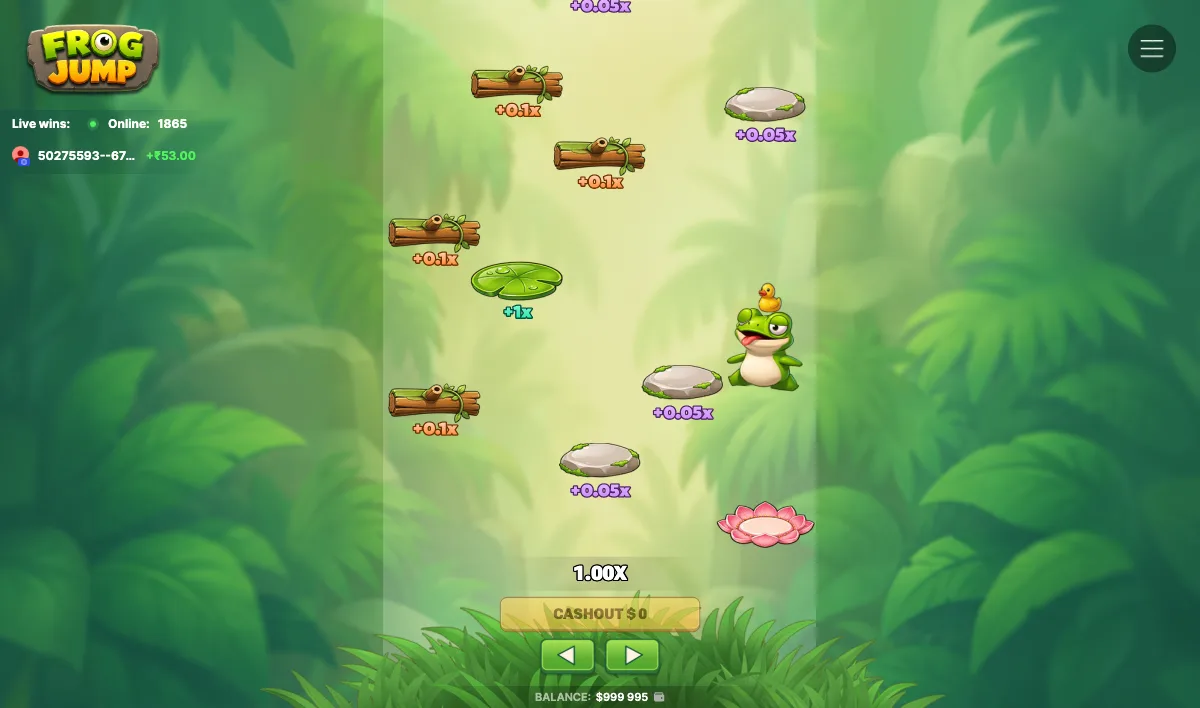
How does a round play from launch to bank?
Put the pieces together and a round runs cleanly, and following one is the fastest way to learn the rhythm. The multiplier is the number your stake is multiplied by at cash-out, and it opens at 1.00x.
For example, on a $5 stake I pressed Play and the balance dropped by 5 dollars immediately, confirming the bet leaves up front. I steered the frog onto a lily pad worth a full 1x, which took the multiplier to 2.00x and the Cash Out figure to $10, exactly the stake times the multiplier. A second lily pad pushed it to 3.00x and $15, and I banked there. Ridden further, that same $5 bet cashed at 5x would pay $25, and at 10x it would pay $50. The catch is that one fumbled hop before you cash crashes the whole round to zero, so the timing of that single Cash Out press is the entire skill.
Autoplay and speed modes
Worth flagging honestly: I couldn’t confirm an autoplay or a speed-mode setting in the build I tested, and InOut doesn’t document one for this game. Some of the studio’s other titles have those features, so don’t assume Frog Jump does. If your operator’s build shows an autoplay toggle, that’s the operator’s addition, and on a game whose entire value is the manual cash-out decision, handing that decision to an autopilot rather defeats the point.
Where the controls trip you up
Two snags caught me repeatedly, and both are worth knowing before you play for real. The first is the lag I mentioned: the input is a DOM overlay over a canvas scene, so on a slow connection the frog hops a beat after your key press, which is frustrating on a timing game and cost me a couple of rounds I’d have banked. The second snag is purely human. Because Cash Out is always available and always tempting, the hardest control to master is the one that says stop, and honestly no button teaches that. I was surprised how often my own greed, not the controls, was the problem.
How we tested the controls
Reviewer Ryan Cole played the official InOut demo hands-on on 21 July 2026, staking 5 dollars a round, per our standard routine. I cycled through the stake chips, tested all three input methods, and deliberately mistimed jumps to confirm what happens on a miss. The 1 million in demo credits made repeated testing cheap. Where a feature wasn’t present or documented, such as autoplay, I’ve said so rather than describing something that isn’t there, in line with our testing methodology.
Sources
- the official InOut Games Frog Jump page, for the game, its 95.5% RTP and its controls
- the SlotsLaunch InOut demo listing, cross-checked for the bet-range claims InOut does not publish
Published 21 July 2026. Updated 21 July 2026. Tested by Ryan Cole.
How do you control the frog in Frog Jump?
You steer each hop with the left and right arrow keys, the A and D keys, or by tapping the left or right side of the screen on mobile. Play and Cash Out are on-screen buttons that stay visible the whole round.
What is the minimum bet in Frog Jump?
InOut does not publish an exact minimum. The demo defaults to $5 with quick chips of 2, 5, 10 and 20 plus MIN and MAX; aggregators cite roughly $0.10 as a floor, but the real limits are operator-set.
Does Frog Jump have autoplay?
We could not confirm autoplay in the build we tested, and InOut does not document one. If your casino’s version offers it, that is an operator feature, and it undercuts the game’s manual cash-out appeal.